ZG106 ZG116 ZGw08VRC / ZGw08PR ZGw063 ZG10U ZG Module
CO2 Regulations Measurement Specifications Application Competitive Advantage
Family Spec. Photos Manuals Catalogs News Release Demo Program COCO / COC
 
Home  
About Us Quality System Products Support Know - How of Gas Monitor Where to buy Contact Us  
 
    Home > Products > Wall Mount CO2 monitor > ZG10U  
 
Wall Mount CO2 Monitor
  ZGw08VRC
  ZGw08PR
  ZGw063 / ZGw063-F
  ZG10U
  ZG01
  ZG02C
(Under Developing)
 
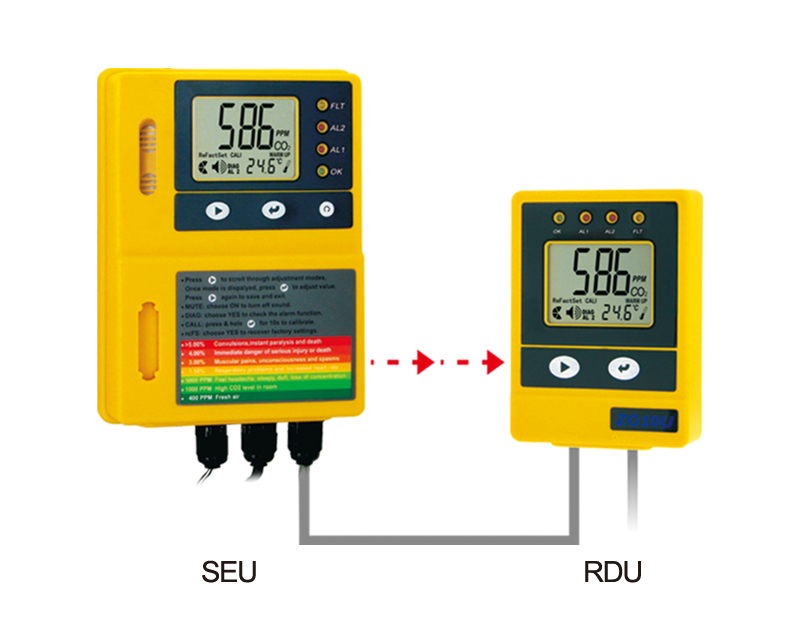
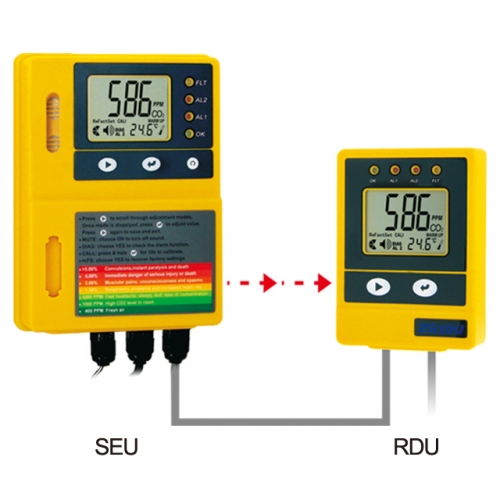
  ZG10U SERIES - ZG10U SEU & RDU  
   
 
SEU (Sensor Unit)
  A.  LCD display
  H.  Enter Button
  B.  Yellow LED
  (Fault indication)
  I.  Communication
   Cable to RDU
  C.  Red 2 LED (AL2)
  J.  Relay output
  D.  Red 1 LED (AL1)
  K.  Power Supply
  E.  Green LED
  (Power indication)
  L.  Rubber Cap
  F.  Reset Button
  M.  Gas Entry
  G.  Mode Button
  N.  Buzzer
 
 
RDU (Remote Unit)
  O.  Green LED
  (Power indication)
  T.  Enter Button
  P.  Red 1 LED (AL1)
  U.  Mode Button
  Q.  Red 2 LED (AL2)
  V.  RJ45 Plug for
   next RDU
  R.  Yellow LED
  (Fault indication)
  V.  RJ45 Plug for
   SEU (Input)
  S.  LCD display
  X.  Buzzer


Features & Display Features and Modes
 
 
Modes
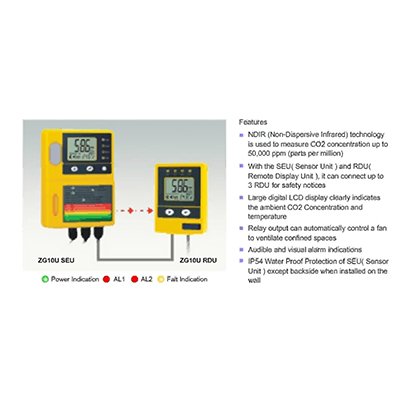
NDIR (Non-Dispersive Infrared) technology is used to measure CO2
  concentration up to 50,000 ppm (parts per million).
With the SEU(Sensor Unit) and RDU (Remote Display Unit), it can connect
  up to 3 RDU for safety notices
Large digital LCD display clearly indicates the ambient CO2 Concentration
  and temperature
Relay output can automatically control a fan to ventilate confined spaces
Audible and visual alarm indications
IP54 Water Proof Protection of SEU( Sensor Unit) except backside when
  installed on the wall
 
 
LCD Display Symbol
 
 
Symbol
Meaning
Description
  CO2 Concentration ppm (Parts Per Million)
  Ambient CO2 concentration
  Temperature (Celsius)
  Ambient temperature in Celsius
  Temperature (Fahrenheit)
  Ambient temperature in Fahrenheit
  Alarm
  The Alarm Icon
  MUTE
  Alarm silencing function icon
  Diagnose
 

Test communications between the SEU and RDU

  First Alarm level
  The relay will be triggered when CO2 concentration exceeds the first alarm level, the Red 1 LED will flash, and buzzer will sound
  Second Alarm level
  Safety Notice “ESC” displays on LCD when CO2 concentration exceeds the second alarm level. The Red 1& Red 2 LEDs will flash, and buzzer will sound
  Calibration
  To calibrate the CO2 sensor when the accuracy deviates from the actual CO2 concentration
  Recover Factory Setting
  To recover factory default settings and cancel any customize settings
  ESC
  To indicate the CO2 leakage once the CO2 level is above 3.0%
  Hi
  The CO2 concentration is above 5%
 
 
SEU (Sensor Unit) Function Instruction
 
 
The SEU (Sensor Unit) should be placed in a room where the CO2 is likely to accumulate, such as a room where CO2 is stored, like an area with CO2 beverages. The large LCD displays the ambient CO2 concentration and the temperature.
  The SEU has the "DIAG", "AL1", "AL2" "CALI", "ReFactSet" function. The "DIAG" function executes communication tests between the SEU and RDU. The user can do the calibration under the "CALI" mode when necessary. If data-setting is done incorrectly, the user can use the "ReFactSet" back to the original factory setting.
  There have "“AL1" "AL2" two alarm levels, the alarm level is adjustable, the first alarm level is with parameter 0.5%, 1%, 1.5%, 2% , the default first alarm level is 1.5% . The second alarm level is with parameter 1.5%, 2%, 2.5%, 3%, 3.5%, 4%, the default second alarm level is 3%.
  When the ZG10U CO2 Monitor detects CO2 concentration that exceeds the first alarm level, the red 1 LED will blink and the buzzer will sound intermittently, the relay will be triggered. If the concentration of CO2 continues to rise above the second alarm level, the red 1 and red 2 LED’s will flash together and the tempo of the buzzer will increase. The green LED will light continuously when the power is normally supplied.
Warning:  If the ambient CO2 concentration reaches the second alarm level, on SEU & RDU, there will be a safety notice "ESC" displays on the LCD, the fault yellow LED will blink, Careful action, such as ventilating the space, must be taken before entering the room where the SEU is placed.
To clear the flashing "ESC" from the LCD, use the "ReFactSet" to restore the unit to the original factory settings, or unplug the AC adapter and reconnect it to the power.
If the communication cable between the SEU & RDU doesn’t connect well, like the communication cable looses in the Input port, the fault LED of SEU will blink, reconnect the cable, if the cable is inserted into the output port, on RDU, after °C/ °F flashing one minute, the "Er7" will flash on LCD. Unplug the cable and plug it into the Input port. The unit will work normally after corrective action.
If cleaning places where the SEU is installed, first take off rubber cap off and putting it on the position of gas entry. Water will not enter into the SEU during cleaning. The following picture shows the position changes of the rubber cap.


RDU (Remote Display Unit) Function Instruction
 
 
The RDU (Remote Display Unit) should be placed outside the room when in use. The RDU is connected to
  the SEU with a wire that has a maximum length of 25 feet. The RDU should be placed where it can be
  conveniently observed before entering the room where the SEU is located. The RDU is a repeater, and
  displays the measurements made by the SEU on an easy-to-read digital LCD along with important safety
  information.
  The RDU has "DIAG" function. The "DIAG" can test the communication between the SEU and RDU. Resetting
  the ZG10U CO2 Monitor is only available from SEU.
 
 
Safety Notes
 
 
Warning: Your safety is very important to us. To ensure to use the product correctly and safety, please read
    these warnings and the entire User Manual before using the product. Otherwise, the protection provided by the equipment may be impaired. These warnings provide important safety information and should be observed at all times.
   
 
1. Please handle the device carefully; do not subject the product to impact or shock.
2. Do not submerge the product into water or any liquid. Water may cause electric shock, fire or malfunction
  which may result in damage
3.
Do not place the unit, or the adaptor near a heat source. Heat can cause distortion of the unit, which may
  result in an explosion or fire.
4. Do not touch the exposed electronic circuitry of the device under any circumstances, as there is the
  dangerous of electric shocks.
5.
Please use the "DIAG" function to verify the communication between SEU and RDU, to make sure the
  communication between SEU and RDU works normally.
6. Please make sure that the power adaptor is mounted by plug lock tightly, so the power adapter can not be
  disconnected without using of mechanical tools.
7.

Do not enter the room directly if there is safety notice "ESC" displays on the LCD of SEU & RDU.

  Some careful and protective action must be taken before entering the room where the SEU is installed.
.8. Please take care of cable connection between SEU and RDU. Make sure the cable from SEU is connected
  into the INPUT port of RDU.
9. Please ensure the external power supply is normally supplied to ventilation fan while the relay is working. If
  there has no normally power supply to the fan, the relay will not work, which may result in potential danger
with high CO2 concentration in confined space.
 
 
Caring For Product
 
 
To make sure to receive the maximum benefit from using this product, please observe the follow guidelines.
 
1. Repair - Do not attempt to repair the product or modify the circuitry by yourself. Please contact your local
  dealer or a qualified repairman if the product needs servicing.
2. Cleaning - Disconnect the power before cleaning. Use a damp cloth. Do not use liquid cleaning agents
  such as benzene, thinner or aerosols, as these will damage the device.  
3. Maintenance – We recommend users to test the communication between the SEU and RDU under "DIAG" function to verify the working conditions for the SEU and RDU. If the four LED’s blink and the buzzer of SEU and RDU sound simultaneously, it indicates that SEU and RDU work normally. When the LCD displays a safety icon "ESC", please take immediate protective action to check if CO2 leakage has occurred. We suggest users to do the calibration and thorough function check once within two year to make sure that the ZG10U CO2 Monitor is working properly.
 
 
Installation Instruction
 
 
Please carefully take out the SEU (Sensor Unit), RDU (Remote Display Unit), panel holders, network cable
  connector,7 meters communication cable, user manual, plug lock, screws,expansion plugs, nail cable clips,
  warning paper from the package.
  Step-by-Step Installation:
 
1. Choose a suitable location to install the SEU. Fix the panel holder on the wall with the four screws
  (included), the recommend installation height is about 0.45 meters from floor and close to the manifolds
  and valves as possible.
2.
Put the SEU on the panel holder, make sure they are connected tightly.
3. Fix another panel holder in a suitable location (the recommend installation height is about 0.45 meters
  from floor) outside the monitored space with screws (included). Push the RDU onto panel holder, and stick
  the warning paper next to RDU. 
4. The communication cable is pre-wired to the SEU. Route the cable to the RDU and fixed the
  communication cable to the wall by nail cable clips, and then plug the cable into the input port on the RDU.
  Communication is now ready between the SEU and RDU.
5. The ZG10U CO2 Monitor has one relay output. The relay cable is pre-wired to SEU. The relay can control a
  fan or blower to ventilate the monitored space when necessary. The relay will be triggered when the CO2
  concentration exceeds the first alarm level.
6.
After finishing the installation, Connected the AC power adapter into the electrical supply outlet,
  Mount the Plug lock by expansion plugs so that the power adapter cannot be disconnected without use of
  mechanical tools. 
7. When the power is connected, The SEU and the RDU will begin to work. Please use the "DIAG" function to
  verify the communication between SEU and RDU, the four LED will blink and buzzer will sound on SEU & RDU. After the communication is ready, the content of display is same on SEU & RDU.
 
 
Mount the plug lock
 
 
Customizing Settings
 
 
  When power has been connected, the SEU and RDU will begin to monitor the CO2 concentration and the temperature. In order to the get the timely alarm safety information and meet the personal requirements, It is advisable to set up the customizing parameter when necessary.
Temperature °C/°F
 
 
1. Press "Enter" to switch between °C and °F temperature
Using the DIAG function
 
 
1. Press Mode until the "DIAG" icon flashes
 
2. Press Enter, the four LED’s will blink on the SEU and the
  3. The four LED’s will blink and buzzer will sound simultane
Setting the First Alarm parameter
 
  1. Press Mode until the "AL1" icon flashes
  2. Press Enter, the "AL1" icon shows on LCD
  3. Press Mode to go through "0.5%, 1%, 1.5%, 2%" alarm level
  4. Press Enter again to save the setting after selection

Setting the Second Alarm parameter

 
  1. Press Mode until the "AL2" icon flashes
  2. Press Enter, the "AL2" icon shows on LCD
  3. Press Mode to go through "1.5%, 2%, 2.5%, 3%, 3.5%, 4%" alarm level
  4. Press Enter again to save the setting after selection
  *Note: The second alarm level should be higher than the first alarm level when setting with the alarm level
            parameter.
Using the CALI function
 
  1.Press Mode until the "CALI" icon flashes
  2.Press Enter, the "CALI" icon shows on the LCD
  3.Press and hold Mode for at least 10 seconds. The "CALIBRATING" icon will flash. The calibration will be 
    done automatically. After 10 minutes the LCD will display "Pass" or "Fail." If "Fail," please try again.
  *Note: When do the calibration, it is suggested to take SEU outside, use the ambient gas for calibration and wait for around 10 minutes until the CO2 reading of SEU doesn’t change. Then, use the 380-420 ppm as the standard CO2 reading. Calibrating the unit according to "CALI" mode instruction, user should not breathe toward to SEU during the calibration process, as the CO2 from the user will affect the CO2 reading of SEU.
Using the ReFactSet function
 
  1. Press Mode until the "CALI" icon flashes
  2. Press Enter, and then press Mode to choose either "Yes" or "No"
  3. Press Enter again to save the setting after selecting
  *Note: If the user sets the data or calibrates the sensor incorrectly, use the ReFactSet (recover the factory
            Setting) to come back the default factory setting.
 
 
Specifications
 
 
  Method - NDIR
 

Sample Method - Diffusion or flow through (50 ~200 ml/min)


Performance - CO2
Measurement Range
 0~50,000ppm (5%) display
Display Resolution  10 ppm
Accuracy  ±100 ppm or ±5% of reading, whichever is greater
Repeatability
 ±20 ppm @400 ppm
Annual Drift  <20 ppm/Year@400ppm
Temperature Dependence
 ±0.2% of reading per °C or ±2 ppm per °C,
  whichever is greater, refer­enced to 25°C
Pressure Dependence
 0.13% of reading per mm Hg
Response Time
 <60 seconds for 90% response to step change
AL1
(First Alarm Level)
 0.5 / 1 / 1.5 / 2 % , Default AL1= 1.5%
AL2
(Second Alarm Level)
 1.5 / 2 / 2.5/ 3 / 3.5 / 4 %, Default AL2= 3%
Warm-Up Time
 <60 seconds at 22°C
Sound Alarm
 80db@10cm
Power Supply
&
Relay Output
Power Supply  AC adapter 110/220 VAC
AC Input  Voltage  100 ~ 240 VAC
Frequency  50 / 60 Hz
Power Requirement
  1 W maximum @ 115 VAC 60 Hz
  2 W maximum @ 230 VAC 50 Hz
AC/DC Output Voltage  6VDC
Power  1.8 W
 Peak Input Current 0.3 A from 6 VDC
 Relay Output 30 VDC or 250 VAC, max 2A, SPST, Normally Open
Temperature specification

  Temperature Range: Display 0°C to 50°C( 32°F to 122°F)
  Display Resolution: 0.1°C(0.1°F)
  Display Options: °C / °F
  Accuracy: ±1°C(±2°F) when CO2 concentration is below first alarm level
  Response Time: 20-30 minutes (case must equalize with environment)
Operating Conditions
  Operating Temperature: 0°C to 40°C ( 32°F to 104°F), 0-95% RH, non-condensing

  Storage Temperature: -20 to 60°C ( -4 to 140°F)
Dimensions
  SEU: 124.8 ×167.7 × 46.57 mm (4.91 × 6.6 × 1.83 inch)  
  RDU: 85.0 × 117.5 × 33.4 mm (3.35 × 46.3 × 1.32 inch)  
Weight (including batteries):
  SEU: 450 grams( oz)
  RDU: 130 grams
Fault Codes & Troubleshooting Guide

This section includes a list of Frequently Asked Questions for problems you may encounter with the ZG10U CO2 Monitor.

No. LCD Fault Icon Description
(of the fault)
SEU Indication RDU Indication Suggested Actions
1 Er3 The ambient temperature has exceeded the temperature range
0°C to 50°C
(32°F to 122°F)
"Er3" flash Fault LED blink, Buzzer  beep “Er3” flash Fault LED blink, Buzzer  beep This error will disappear when the temperature returns to the range between 0°C and 50°C
(32°F to 122°F)
2 Er4 Some wrong measurement or the sensor has exceeded its expected life

"Er4" flash. Fault LED blink, Buzzer  beep

“Er7” flash. Fault LED blink, Buzzer  beep

Please unplug the AC adapter and reconnect it. If the "Er4" always appears, please contact with the local dealer.
3 Er5
Er6
EEPROM System Problem "Er5”&"Er6" flash, Fault LED blink, Buzzer  beep

“Er7” flash, Fault LED blink, Buzzer  beep

Please unplug the AC adapter and reconnect it. If the “Er5,Er6” always appear, please contact with the local dealer.
4 Er7 Internal Data Transmission Error “Er7” flash, Fault LED blink, Buzzer  beep “Er7” flash, Fault LED Blink, Buzzer  beep

1. Please unplug the AC adapter and reconnected it.

2. Check the RJ45 plug is connected into the INPUT port of RDU,if the "Er7" displays on the RDU only.

5 Er8 The accuracy of CO2 sensor may deviate from the actual CO2 concentration “Er8” flash Fault LED   blink, Buzzer  beep “Er8” flash Fault LED blink, Buzzer  beep

1.Please unplug the AC adapter and reconnect it If the "Er8" still appears, please contact with the local dealer.

2. Please calibrate the unit, after the calibration, If the "Er8" still appears, please contact with the local dealer.

Kinds of Adapters for your option
ACAeu
(for European ,
including
GermanItaly )
ACAgb
(for British,
including
Singapore、
BS1363 )
ACAau
(for Australia
New Zealand)
ACAus
(for American ,
including
JP、CN)


TOTAL: